


DirecTV |
« Previous Entries | Next Entries » |
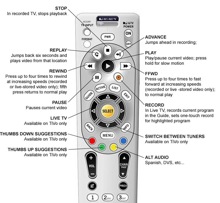 Don’t let your DirecTV remote intimidate you. Programming it couldn’t be any easier. First press the MENU button on the remote. You will then select “Parental, Favs and Setup.”
Select the option “System Setup” and then hit “Remote.” You will then just need to press the option that says “Program Remote.” Now you are ready to set the remote up for your various devices.
Simply point the remote at the device and follow the instructions on the screen. You will have the remote set up to work your DVD player, TV or other such device in no time.
Programming your white DirecTV remote to your TV is just as simple. First find the control codes for the DirecTV remote. With your TV on slide the mode switch on the top of the remote to “TV.”


